cleair documentation
Make sure you are using Python 3.10 or later, then install the Python SDK:
pip install "cleair @ git+https://github.com/cleairlabs/cleair.git@main#subdirectory=sdks/python"
Then, to try cleair in action, create a file named example.py:
import cleair

@cleair.observe(name="research", capture_input=True, capture_output=True, as_type=cleair.type.AGENT)
def research(topic: str) -> str:
    return f"Research result for {topic}"

if __name__ == "__main__":
    cleair.init(service_name="My agent", cleair_api_key="<api-key>")
    print(research("quantum computing"))
Replace <api-key> with your cleair API key, then run the example:
python example.py
Tech Stack
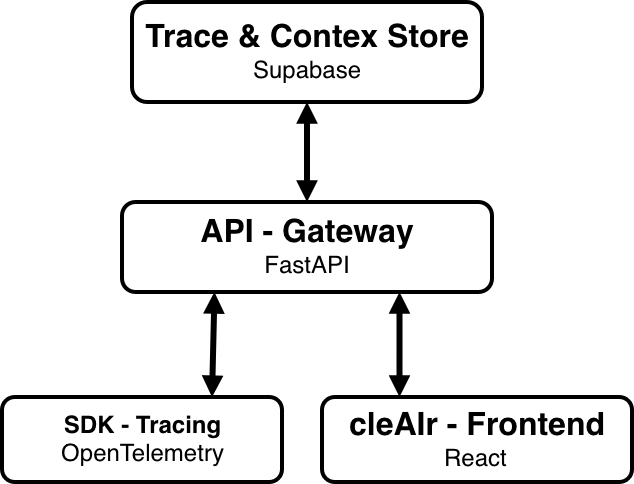
cleair currently only offers a Python SDK (JS/TS SDK planned).
The Python SDK instruments agent runs and exports traces to a FastAPI ingestion service.
The API processes trace events, keeps the current run state, and streams live updates to connected clients.
The React frontend presents each run as a structured trace, making it easier to follow agent activity and inspect individual spans.